Why Industrial Service Teams Are Still Building Maintenance Checksheets by Hand and How docAgent Actually Fixes It
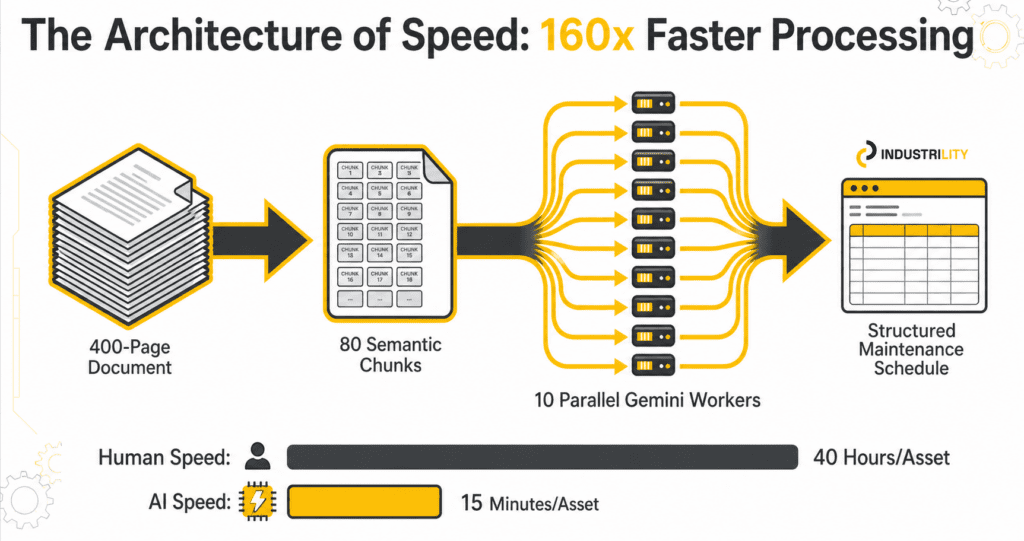
Every industrial service team eventually hits the same wall. A new asset needs a preventive maintenance checksheet. The manual is 400 pages. A planner opens it, starts working through it page by page, and a task that was never on anyone’s roadmap quietly consumes half a week. Meanwhile the installed base keeps growing, the documentation backlog widens, and the gap between what the manual specifies and what actually reaches the technician in the field keeps getting bigger.
docAgent does not change who your planners are. It changes how much of their time is spent on transcription versus judgment.
What docAgent Actually Does
docAgent reads equipment manuals, extracts every preventive maintenance task they contain, and converts them into a structured, verifiable, field-ready checksheet in minutes rather than hours. It understands how equipment manuals are structured, identifies maintenance activities and their frequencies, preserves page and section references for every task, and hands the final judgment back to your team.
▌ SCENARIO
A multi-stage industrial compressor is being onboarded into your service program. In the old workflow, a planner pulls the 380-page manual and spends the better part of a week producing a usable checksheet. In the docAgent workflow, they upload the manual, open a structured view of every extracted task grouped by frequency, verify against the source pages linked in the Reference column, remove two duplicates, add one task the extraction missed, apply the corporate template, and download a formatted Word document. Total time: under an hour.
The Six-Step Workflow
- Create Extraction Jobs. Define the asset, assign the relevant documents, and configure the extraction job. This is where the scope of the checksheet is set before any processing begins.
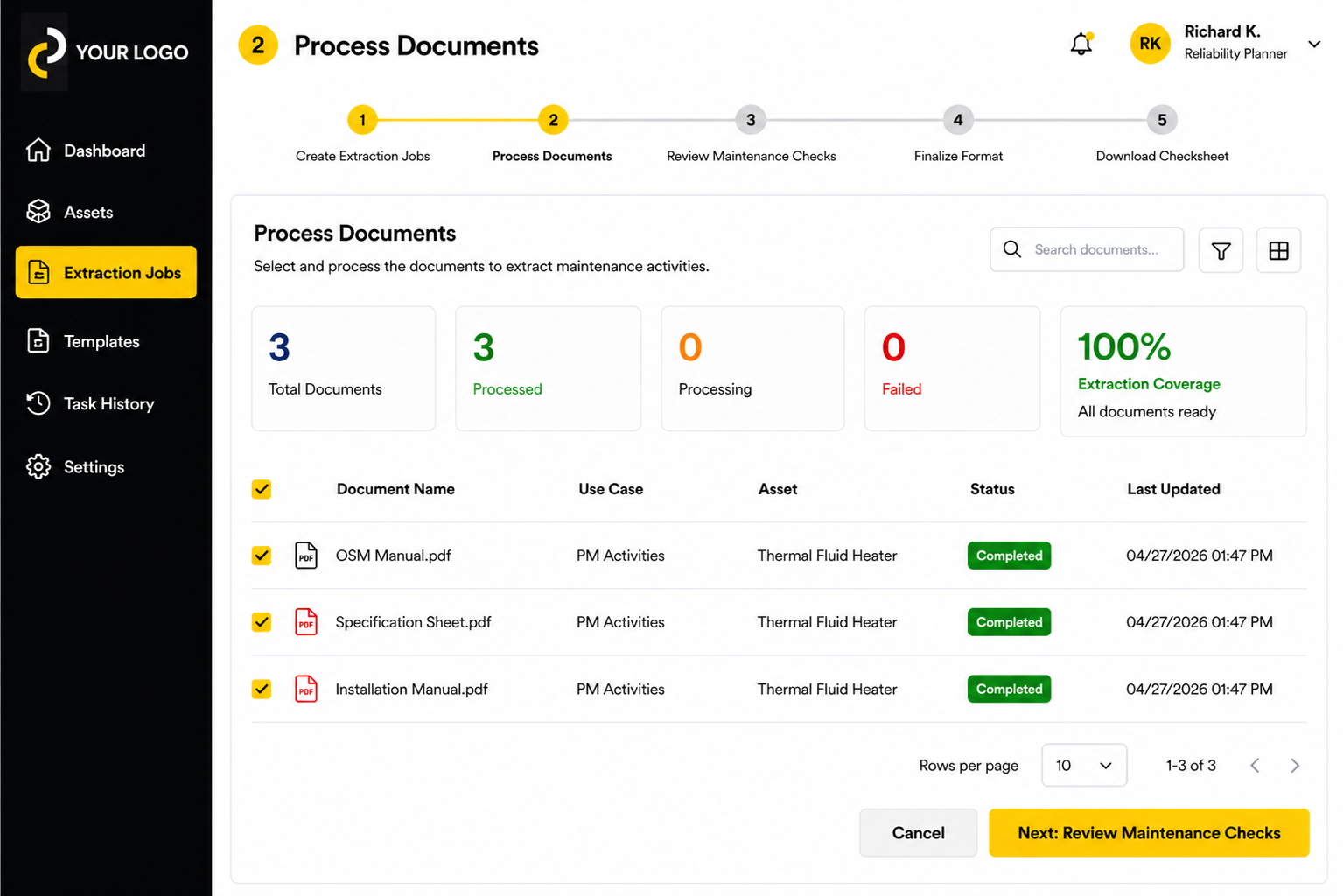
- Process Documents. Confirms which manuals have been processed for an asset and shows extraction status — so you never generate a checksheet from incomplete inputs. The dashboard displays total documents, how many have been processed, and overall extraction coverage, reaching 100% only when all source documents are ready.
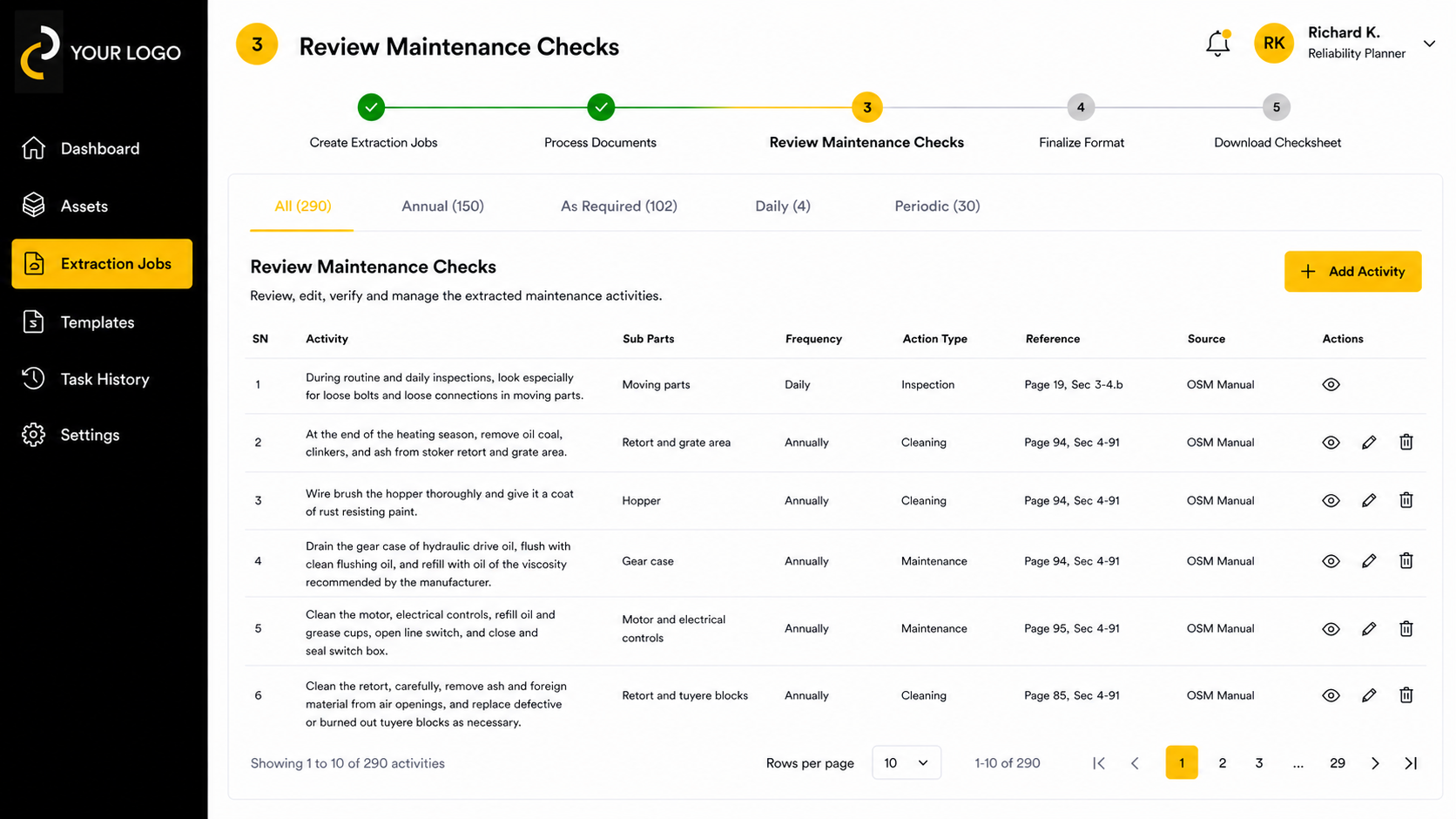
- Review Maintenance Checks. Extracted tasks appear in a structured table, filtered by frequency tabs (Annual, As Required, Daily, Periodic, and more). Every task shows Sub Parts, Frequency, Action Type, Reference, and Source columns. Tasks can be added, removed, or edited at any point in this stage.
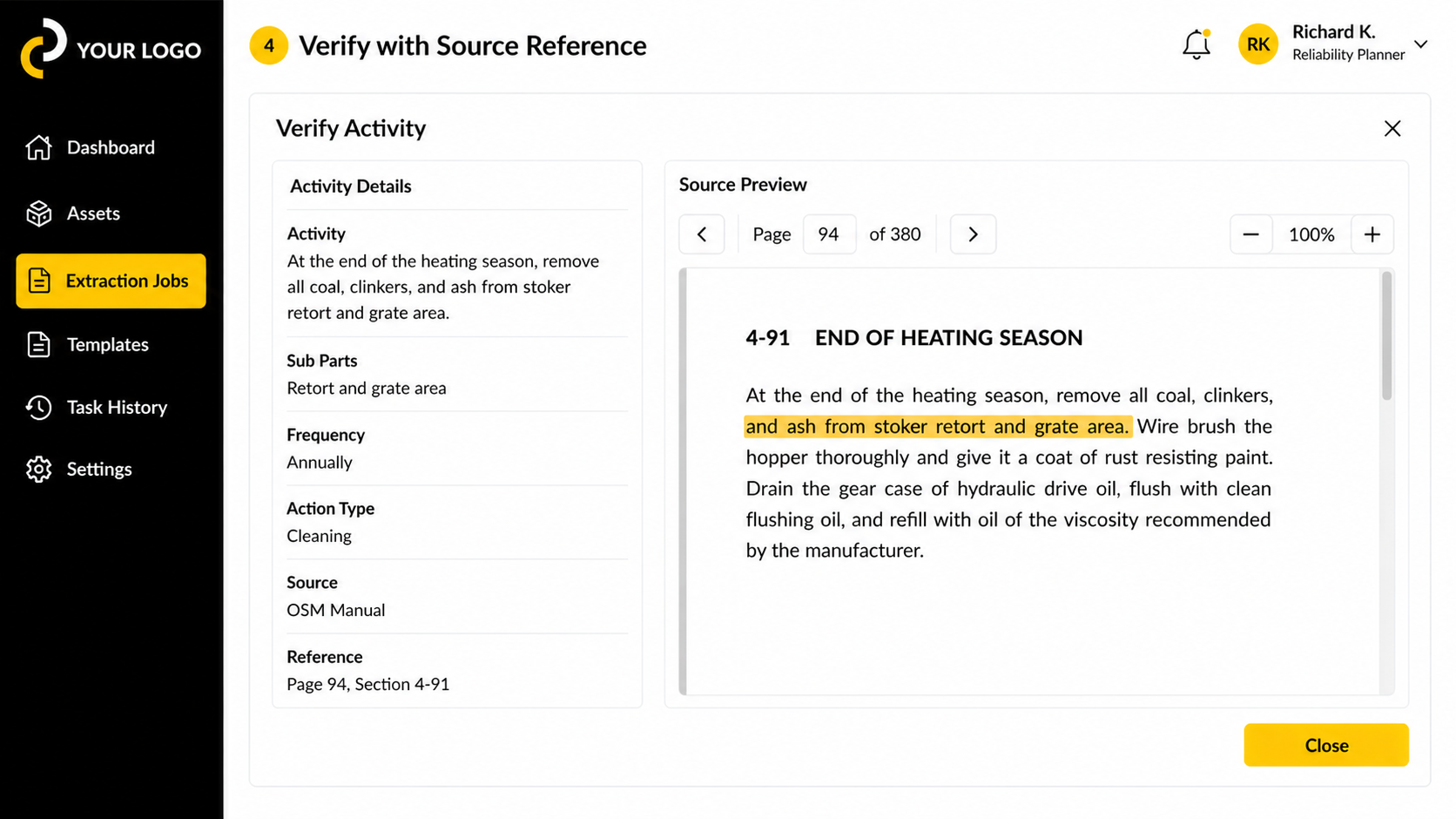
- Verify with Source Reference. Any extracted task can be opened in a side-by-side verification view. The Activity Details panel shows the task description, sub parts, frequency, action type, source document, and exact page and section reference. The Source Preview panel opens the original document to that page with the relevant passage highlighted. Planners can navigate the source document, zoom in, and confirm accuracy against the original before anything reaches the field — with full traceability back to the manual.
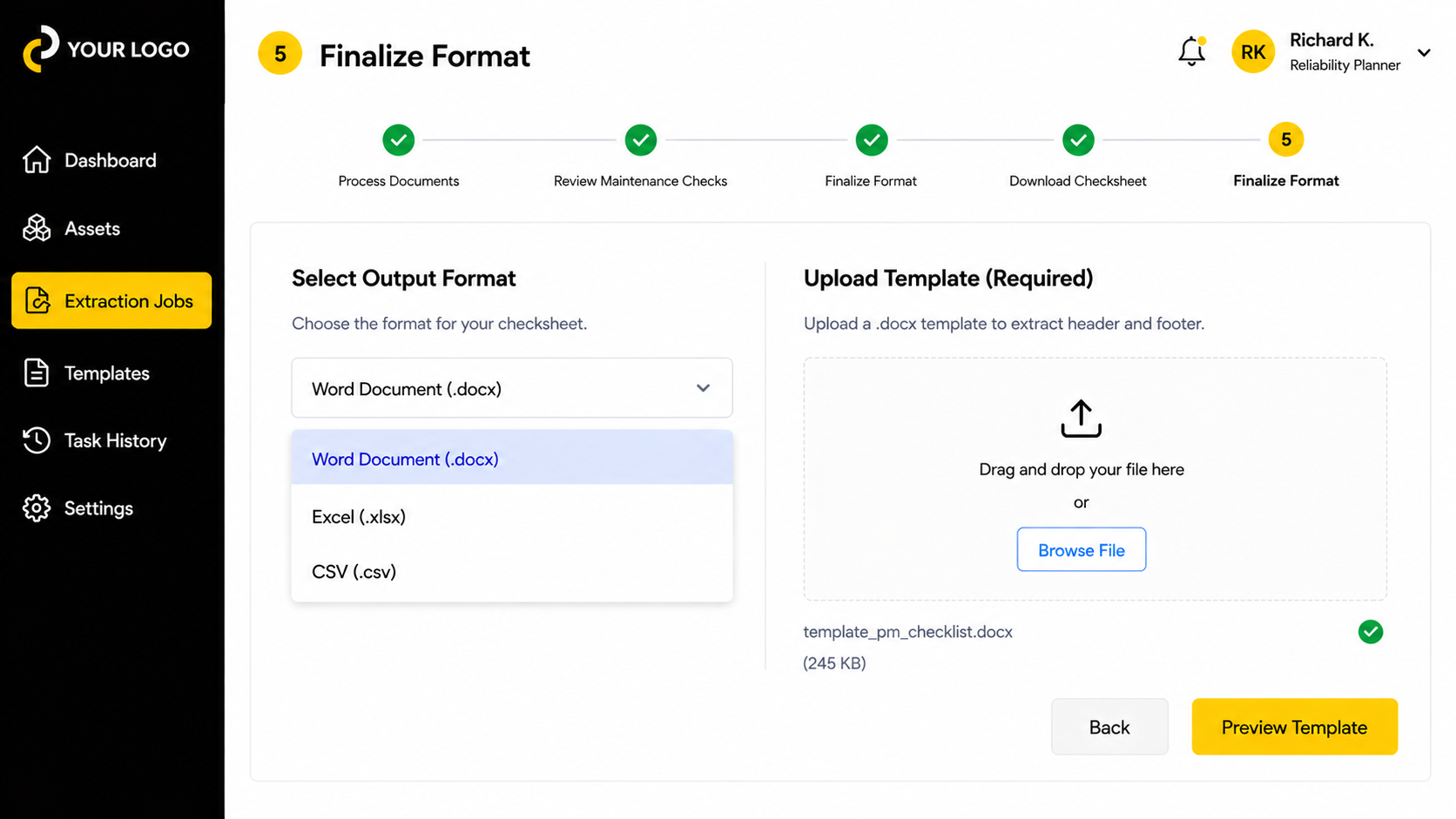
- Finalize Format. Select the output format — Word Document (.docx), Excel (.xlsx), or CSV (.csv) — and upload a .docx template to carry your organisation’s header and footer into the final file. A field copy for a technician and a compliance record for an auditor come from the same reviewed dataset.
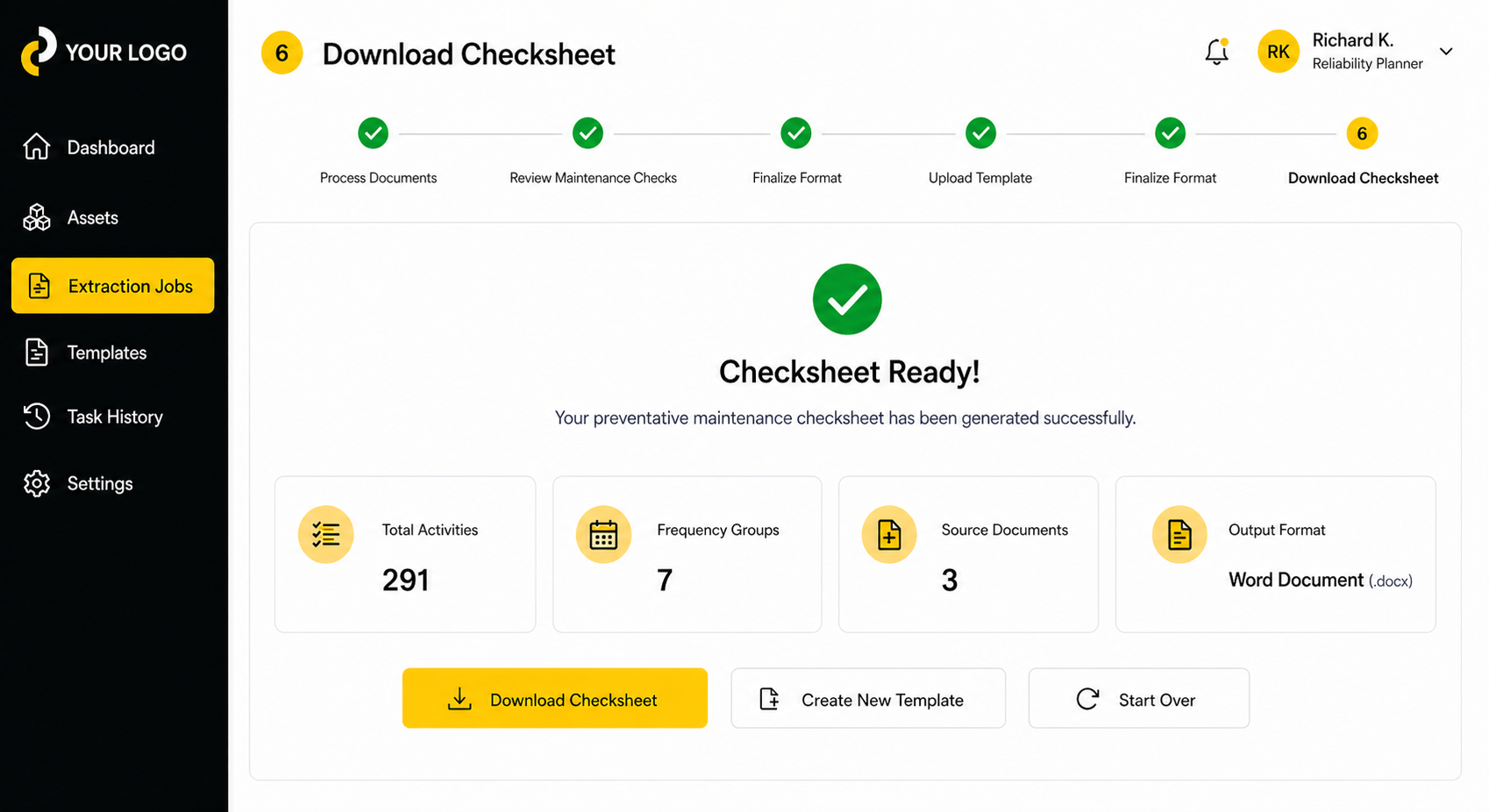
- Download Checksheet. Reviewed and approved tasks download as a formatted file. The completion screen confirms total activities extracted, number of frequency groups, source documents processed, and output format — giving a full summary before the file lands. Need a different layout? Upload a different template and re-export without repeating the review.
Built for the Realities of Industrial Service
- The Remark column is intentionally left blank. It is for technicians to complete in the field during the actual maintenance event never pre-populated.
- Extraction job history preserves every run. Multiple jobs can exist for the same asset, giving organisations a clean audit trail of which documents produced which checksheets.
- Frequency tabs mirror how planners review. Systematic review by interval annual, quarterly, as-needed is how experienced maintenance planners already work.
Where docAgent Fits in the Industrility Platform
docAgent sits within Industrility’s Field Service capability. The Installed Base Intelligence, parts commerce, and digital monitoring across the platform all become more valuable when the preventive maintenance program underlying them is grounded in accurate, verified, asset-specific checksheets. Teams can also leverage customer support capabilities and the TwinGPT app as part of the broader Industrility platform.
For manufacturers serving compressors and generators, HVAC, packaging and printing, material handling, and CNC machining, the quality of PM documentation is a direct driver of uptime and customer trust. docAgent closes the gap between what a manual specifies and what actually reaches the field.